RabbitMQ 4.3 Highlights

We are excited to announce the release of RabbitMQ 4.3. This release brings powerful new capabilities designed to help you build more resilient, scalable, and observable messaging architectures.
Major enhancements to the open-source broker include:
We are also introducing the following new enterprise features in VMware Tanzu RabbitMQ:
- JMS queue type
- Connector for Apache Spark
- Stream browser in the Management UI
- Message scheduler
- Linter
Open-Source RabbitMQ
Quorum Queue Features
Quorum queues were introduced seven years ago in RabbitMQ 3.8. They are the recommended queue type for data safety, durably persisting messages to disk and replicating them across RabbitMQ nodes.
Built on the Raft consensus algorithm, quorum queues implement a replicated state machine. This ensures data consistency during network faults, maintaining availability as long as a majority of the queue members remain online.
Almost every minor release has brought enhancements to quorum queues, and RabbitMQ 4.3 is no exception, delivering significant new features.
Support for 32 Strict Message Priority Levels
Prior to RabbitMQ 4.0, quorum queues did not support message priorities.
RabbitMQ 4.0 through 4.2 supported two relative priority levels: normal and high. If a queue contained both, consumers received a mix at a ratio of two high-priority messages for every one normal-priority message.
RabbitMQ 4.3 introduces support for 32 strict priority levels. Messages with a higher priority are now delivered to consumers strictly before those with a lower priority.
As highlighted by the orange rectangle below, the Management UI now displays per-priority message counts for each quorum queue, allowing operators to monitor queue depth by priority level:
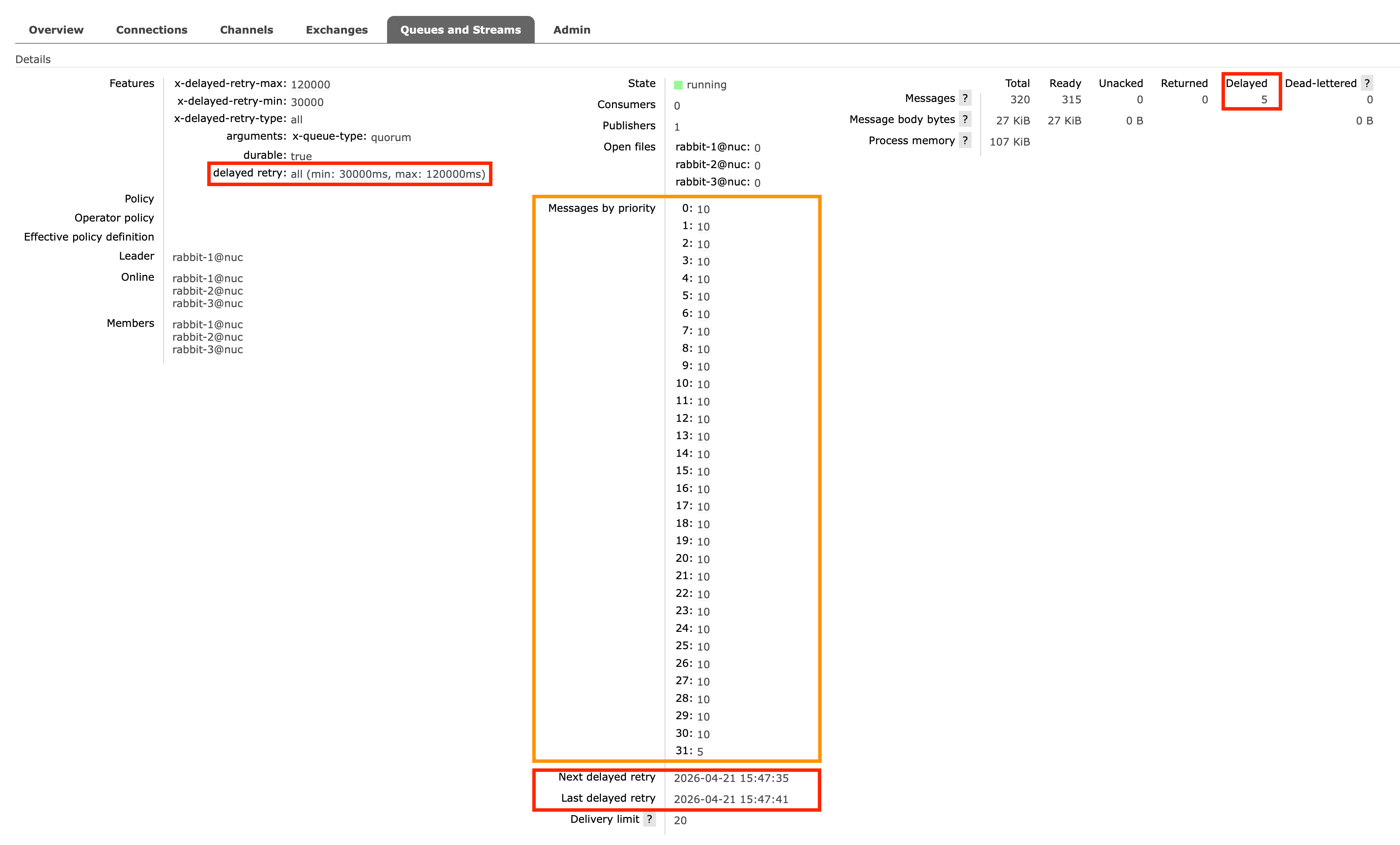
The red rectangles highlight the new Delayed Retries feature, which we cover next.
Delayed Retries
Delayed retries are essential when specific messages cannot be processed due to transient failures. Common examples include:
- Entity-Specific Rate Limits: An API might rate-limit requests for a specific user ID while allowing requests for others.
- Database Locks: A single row in your database might be temporarily locked. Pausing the entire consumer would prevent you from updating thousands of other unlocked rows.
If a consumer cannot process any messages — for example, due to an entire downstream database being offline — it is better to temporarily pause the consumer rather than delaying every message. Once the database is restored, you can resume the consumer.
Before RabbitMQ 4.3, implementing delayed retries required one of two complex workarounds:
-
Dead-letter cycles: Consumers could reject the message, routing it to a dead-letter queue. This queue would have a message-TTL configured, after which the message was dead-lettered back to the original queue:
+-------------------+ 1) Consume +----------+| Original Queue | -------------------> | Consumer |+-------------------+ <------------------- +----------+| ^ 2) Reject| || || 3) Dead-letter | 4) Dead-letter after TTL| |v |+-------------------+| Dead-letter Queue || (with TTL) |+-------------------+The downside is that RabbitMQ must rewrite the message twice. Furthermore, the default at-most-once dead-letter strategy risks message loss, while at-least-once dead-lettering introduces its own caveats.
-
Re-publishing to a message scheduler: Alternatively, consumers could re-publish the failed message to a message scheduler.
+-------------------+ 1) Consume +----------+| Original Queue | -------------------> | Consumer |+-------------------+ <------------------- +----------+^ 3) Acknowledge || || 4) Publish after delay | 2) Re-publish new message with delay| || |+-------------------+ || Message Scheduler | <----------------------++-------------------+This also forces the message to be rewritten. Additionally, if a network failure occurs between the client and RabbitMQ after the re-publish but before the acknowledgement, the message is both re-published and re-queued. This creates duplicates: one copy in the scheduler and another in the original queue.
RabbitMQ 4.3 introduces a much cleaner solution: The quorum queue simply sets the delayed message aside internally, making it available for redelivery (to any consumer) only after the configured delay elapses.
  +--------------------------------+
  |          Quorum Queue          |
  |                                |     1) Consume       +----------+
  |  [Message set aside until      | -------------------> | Consumer |
  |   configured delay elapses]    | <------------------- +----------+
  |                                |     2) Return
  +--------------------------------+
The key benefits include:
- Improved Performance: Messages are not rewritten, lowering broker resource overhead.
- Simpler & Safer Semantics: Eliminates the risk of message loss or duplication.
- Granular Control: Delays can be configured per queue or per message.
To configure delayed retries, use the following queue arguments or policies:
x-delayed-retry-type(queue argument) ordelayed-retry-type(policy): Defines the conditions for delaying a message. Options aredisabled(default),all,returned, orfailed. (See the Unlimited Returns table below for the difference betweenreturnedandfailed).x-delayed-retry-min/delayed-retry-min: The minimum delay time in milliseconds.x-delayed-retry-max/delayed-retry-max: The maximum delay time in milliseconds (defaultsdelayed-retry-min).
The delay is calculated using linear backoff based on the message's delivery-count:
min(delayed-retry-min * delivery-count, delayed-retry-max)
Consequently, a message's delay increases the more often it is returned. For example, with delayed-retry-min=30000 and delayed-retry-max=120000:
- 1st return: 30s delay
- 2nd return: 60s delay
- 3rd return: 90s delay
- 4th return and beyond: 120s delay (capped at max)
Consumers can also dynamically override this delay on a per-message basis. Using AMQP 1.0, a consumer can return a message with the x-opt-delivery-time annotation (a Unix timestamp in milliseconds) in the modified outcome.
This explicit instruction overrides the calculated linear back-off, allowing exact control over redelivery timing.
Defining the delayed retry per-message is useful for entity-specific rate limits.
Imagine your consumer updates records in a third-party SaaS platform.
If the API rejects an update for Tenant A with an HTTP 429 (perhaps they hit their specific tier limit) and a Retry-After header, you don't want to pause your entire consumer and block updates for Tenants B and C.
Instead, your consumer can parse that header and set x-opt-delivery-time just for Tenant A's message.
This ensures the message is redelivered precisely when the API is ready for that specific tenant, while the rest of your system processes normally.
Support for Unlimited Returns
Up to RabbitMQ 4.2, every requeued message incremented its delivery-count by 1, regardless of the reason.
Poison message handling would dead-letter the message once this count exceeded the queue's delivery-limit (default: 20).
Starting with RabbitMQ 4.3, quorum queues track two distinct counters: acquired-count and delivery-count.
acquired-countincrements every time a message is requeued.delivery-countonly increments when a message is requeued due to a failed delivery attempt.
Because poison message handling is still tied to the delivery-count, messages returned without marking the attempt as a failure no longer count toward the limit.
In short, RabbitMQ 4.3 now supports unlimited returns.
By definition, acquired-count will always be greater than or equal to delivery-count. The table below outlines what constitutes a failed delivery:
| Trigger | acquired-count increments | delivery-count increments (delivery attempt failed) |
|---|---|---|
AMQP 1.0 released disposition | ✅ | ❌ |
AMQP 1.0 rejected disposition | ✅ | ✅ |
AMQP 1.0 modified disposition with delivery-failed=false | ✅ | ❌ |
AMQP 1.0 modified disposition with delivery-failed=true | ✅ | ✅ |
AMQP 0.9.1 basic.nack | ✅ | ❌ |
AMQP 0.9.1 basic.reject | ✅ | ✅ |
| Client crash / Connection loss | ✅ | ✅ |
| Intra-cluster network partition (consumer node suspected down) | ✅ | ❌ |
| Consumer timeout (consumer doesn't acknowledge in time) | ✅ | ❌ |
Consumer Timeouts
Consumer timeouts (also known as "message locks") protect against slow or stuck consumers by limiting how long they can hold unacknowledged messages before the broker intervenes.
Historically, timeouts were evaluated globally across all queue types, and a timeout triggered a disruptive AMQP 0.9.1 channel closure. This abruptly terminated all consumers on the channel, not just the stuck one.
In RabbitMQ 4.3, timeout handling has been shifted directly into quorum queues and the new JMS queues. Because classic queues and streams rarely require this feature, they no longer evaluate consumer timeouts.
When a consumer timeout occurs on a quorum queue, the timed-out messages are returned to the queue (making them available for redelivery), and the server notifies the client using a more graceful, protocol-specific mechanism:
- AMQP 1.0: Timed-out messages are released via
DISPOSITION(state=released)instead of detaching the link. This allows the consumer to recover without needing to re-attach. - AMQP 0.9.1: If the client supports the
consumer_cancel_notifycapability (which most modern clients do), the server sends abasic.cancelnotification to cancel only the timed-out consumer, leaving the channel and other consumers intact. If the client lacks this capability, the server falls back to closing the channel to maintain backwards compatibility.
Consumer timeouts can be configured in milliseconds at four levels (in order of precedence):
- Consumer Argument:
x-consumer-timeout(at consumer creation). - Queue Argument:
x-consumer-timeout(at queue declaration). - Queue Policy:
consumer-timeoutkey. - Global Configuration:
consumer_timeoutinrabbitmq.conf(defaults to 1800000 ms, or 30 minutes).
Consider increasing the timeout if your consumers execute legitimately long-running tasks exceeding 30 minutes.
Conversely, you might want to decrease the timeout for consumers that process messages very quickly; in this case, if a consumer is stuck, a shorter timeout ensures the message is redelivered to another healthy consumer much sooner.
Memory Usage Reduced by 50%
The per-message memory overhead has been halved for messages that are up to 32 KiB in size, significantly reducing the overall memory footprint of quorum queues.
Khepri
RabbitMQ metadata includes the definitions of queues, exchanges, bindings, vhosts, users, and permissions. Historically, this data was stored in Mnesia, Erlang/OTP's built-in distributed key-value database.
However, Mnesia has two main drawbacks:
- It is prone to inconsistencies during network partitions.
- It suffers from slow performance under heavy concurrent operations because transactions requiring the same database lock face artificial delays.
To solve this, the RabbitMQ team developed Khepri, an open-source distributed database built on Raft. Khepri guarantees consistency during network faults and delivers superior performance under concurrent client operations by executing transactions serially without database locks.
After experimental support in 3.13 and becoming the default for new clusters in 4.2, Khepri is now the only supported metadata store in RabbitMQ 4.3.
Mnesia — along with partition handling strategies like pause_if_all_down, pause_minority, and autoheal — has been entirely removed.
We recommend enabling the khepri_db feature flag before upgrading to 4.3.
Otherwise, RabbitMQ will migrate all metadata from Mnesia to Khepri during the boot process of a 4.3 node.
AMQP 1.0 Improvements
Following the introduction of native AMQP 1.0 support in 4.0, AMQP 1.0 over WebSocket and Filter Expressions in 4.1, as well as SQL Filter Expressions in 4.2, RabbitMQ 4.3 brings two more AMQP 1.0 enhancements.
Rejected-by & Rejection Reason
When a queue rejects a message, RabbitMQ now passes the queue name and the specific rejection reason (e.g., maximum length reached, queue unavailable) back to the AMQP 1.0 publisher in the Rejected outcome. This is useful when multiple queues are bound to a single exchange, allowing publishers to pinpoint exactly which queue failed and why.
Consumer Activity Notification
RabbitMQ now signals link state information to consumers via AMQP 1.0 flow frame properties. When consuming from a quorum queue with Single Active Consumer enabled, RabbitMQ will notify the consumer immediately upon transitioning from an inactive (waiting) state to an active state, and vice versa.
VMware Tanzu RabbitMQ
VMware Tanzu RabbitMQ is the commercial edition of RabbitMQ, layering enterprise-grade, closed-source plugins over the open-source core. Release 4.3 packs several powerful new extensions.
JMS Queue Type
VMware Tanzu RabbitMQ 4.3 introduces a purpose-built queue type for JMS (Java Message Service) applications. Backed by Raft, the new JMS queue type provides the same safety guarantees as Quorum Queues: messages and their delivery states are replicated across nodes, ensuring durability and consistency even during network failures.
This architecture offers a massive advantage over legacy JMS brokers, which typically rely on shared storage (SAN/NAS) or fragile active/passive failovers susceptible to split-brain scenarios and data loss.
While optimized for the Qpid JMS client over AMQP 1.0, this queue is cross-protocol by design. A consumer could be a JMS application, while the publisher could be a non-Java client operating over AMQP 1.0, AMQP 0.9.1, STOMP, or MQTT.
JMS Message Selectors
Message selectors allow consumers to filter messages directly on the broker using SQL-like syntax.
To enable this, queues must be configured with the x-selector-fields argument or selector-fields policy (e.g., selector-fields = ["category", "price", "in_stock"]), which keeps these message properties in memory for rapid evaluation.
// Create a consumer with a message selector
String selector = "category = 'electronics' AND price BETWEEN 100 AND 500 AND in_stock = TRUE";
MessageConsumer consumer = session.createConsumer(queue, selector);

// Receives only messages matching the SQL expression
Message msg = consumer.receive(5000);
Queue Browser
The Queue Browser lets consumers non-destructively inspect queued messages without removing them, which is ideal for debugging without interrupting active processing flows. Browsers fully support message selectors as well!
// Create a QueueBrowser with a message selector
String selector = "category = 'electronics' AND price > 1000";
QueueBrowser browser = session.createBrowser(queue, selector);
Enumeration enumeration = browser.getEnumeration();

// Iterate through the matching messages
while (enumeration.hasMoreElements()) {
    Message msg = (Message) enumeration.nextElement();
    System.out.println("Browsed high-value electronics order: " + msg);
}

browser.close();
Message Delivery Delay
Publishers can now specify a delivery delay. The queue will accept the message but hide it from consumers until the specified time elapses.
MessageProducer producer = session.createProducer(queue);
producer.setDeliveryDelay(10_000); // 10 seconds
producer.send(session.createTextMessage("Delayed payload"));
Apache Spark Connector
Apache Spark is a popular open source project for large-scale data analytics and machine learning workloads.
VMware Tanzu RabbitMQ 4.3 ships a new RabbitMQ Stream Connector for Apache Spark providing high-speed, parallel data transfer between RabbitMQ Streams and an Apache Spark cluster. It bridges the gap between high-throughput messaging and big data processing. By combining them, you get a powerful, end-to-end pipeline where RabbitMQ acts as the reliable, high-speed ingestion layer (the "nervous system") and Spark acts as the distributed computing engine (the "brain").
This unlocks advanced, enterprise-scale use cases:
- Unified Batch and Stream Processing: Because Streams store data durably and support arbitrary offset replay, the exact same Structured Streaming code can process historical batches and live data.
- Real-time Machine Learning (MLlib): Train models on historical data and apply them to live streams for instant fraud detection or dynamic pricing.
- Complex Windowed Aggregations: Execute time-windowed Spark SQL queries (e.g., "5-minute rolling temperature averages") directly against live RabbitMQ streams.
- On-the-Fly Enrichment: Join fast-moving event streams with static database tables before sinking the enriched data.
- Data Archival: Batch historical stream data into long-term cold storage or data lakes.
Key features:
- Super Stream Support: Scales seamlessly from individual streams to partitioned Super Streams.
- Flexible Offsets: Start reading from the absolute beginning, the current tail, a specific offset, or a timestamp.
- Optimized Field Extraction: Pull only the required fields to minimize memory consumption.
- Built-in Rate Limiting: Cap records per trigger interval for predictable performance.
- Full AMQP Access: Read payloads, properties, and temporal fields simultaneously.
- Deterministic Partitioning: Hash-based partitioning for writing Spark data back to RabbitMQ Streams.
Example: IoT Sensor Aggregation
To see this in action, imagine thousands of IoT sensors publishing to a Super Stream. Using Spark Structured Streaming, we can parse the JSON, filter out noise, and calculate rolling averages before saving to a Postgres database:
// 1. Read from the RabbitMQ Super Stream
Dataset<Row> rawStream = spark.readStream()
    .format("rabbitmq-stream")
    .option("uris", "rabbitmq-stream://guest:guest@localhost:5552/%2f")
    .option("super.stream", "iot-sensor-stream")
    .option("starting.offsets", "next")
    .option("rmq.stream.select.fields", "timestamp,payload")
    .load();

// 2. Parse the JSON payload
StructType sensorSchema = new StructType()
    .add("device_id", DataTypes.StringType)
    .add("temperature", DataTypes.DoubleType)
    .add("humidity", DataTypes.DoubleType);

Dataset<Row> parsed = rawStream
    .select(col("timestamp"), from_json(col("payload").cast("string"), sensorSchema).as("data"))
    .select(col("timestamp"), col("data.*"));

// 3. Filter out invalid readings
Dataset<Row> valid = parsed.filter(
    col("temperature").between(-40, 80)
    .and(col("humidity").between(0, 100))
    .and(col("device_id").isNotNull())
);

// 4. Aggregate metrics over a 30-second tumbling window
Dataset<Row> deviceAgg = valid
    .groupBy(
        window(col("timestamp"), "30 seconds"),
        col("device_id")
    )
    .agg(
        avg("temperature").as("avg_temp"),
        avg("humidity").as("avg_humidity"),
        count("*").as("reading_count")
    );

// 5. Upsert aggregated data to a database
StreamingQuery query = deviceAgg.writeStream()
    .outputMode("append")
    .trigger(Trigger.ProcessingTime("5 seconds"))
    .foreachBatch((batchDF, batchId) -> {
        batchDF.write().jdbc("jdbc:postgresql://localhost:5432/iot", "device_stats", connectionProperties);
    })
    .start();
Stream Browser
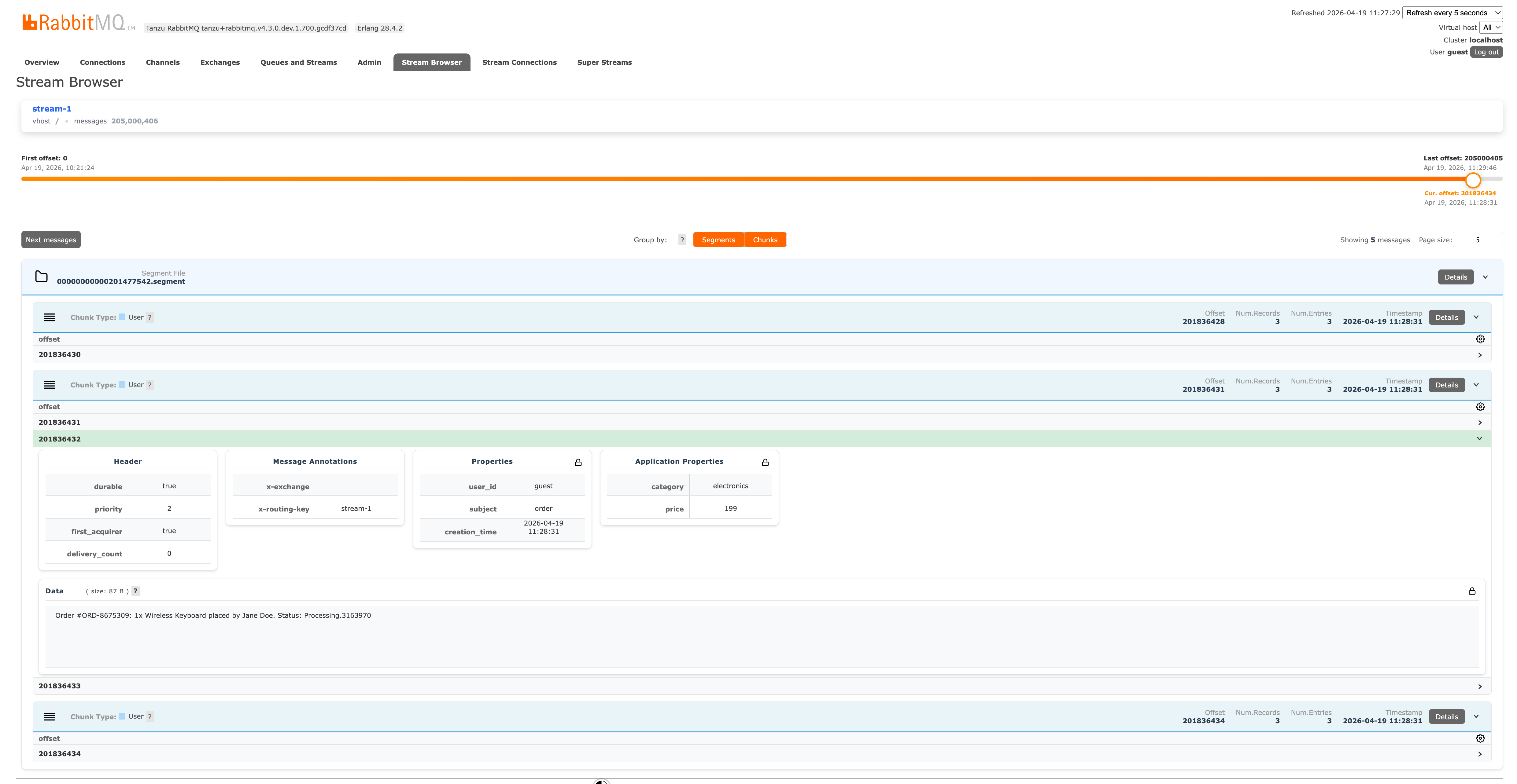
The Stream Browser is a new Management UI plugin offering direct visibility into your stream contents. Found under the Stream Browser tab, it provides:
- Unified Search: Instantly locate streams and super-streams.
- Flexible Navigation: Start browsing by absolute offset, timestamp, or from the head/tail.
- Deep Inspection: View data in tabular format or expand individual messages to see all AMQP 1.0 sections.
- Structural Views: Navigate by physical segment files and chunks to understand low-level disk layout.
- Selective Downloads: Choose which message sections to download, saving bandwidth.
Here is a look at the Stream Browser exposing the on-disk stream layout:
Message Scheduler
A message scheduler allows producers to target a specific future delivery time. The broker holds the message outside the target queue(s) until the delay expires, at which point it internally publishes the message.
This "publish at time T" paradigm is perfect for:
- Business workflows: "Send an abandoned cart email in 2 hours."
- Temporal decoupling: Ensuring events aren't processed prematurely.
- Fan-out: Routing a single delayed message to multiple queues (e.g., send a message later to any online subscriber).
Historically, scheduling relied on the community-supported rabbitmq-delayed-message-exchange plugin. Due to severe architectural limitations, that plugin has been deprecated and archived.
VMware Tanzu RabbitMQ 4.3 replaces it entirely with a new, enterprise-grade Delayed Queue plugin:
- High Availability: Fully backed by Raft replication.
- Standard Protocols: Uses standard AMQP 1.0 annotations (
x-opt-delivery-time,x-opt-delivery-delay) for absolute and relative delays. - Pub/Sub Integration: Seamlessly works with exchanges (e.g.,
topic), ensuring one delayed message can route to many MQTT or JMS subscriptions. - Bounded Memory: Memory footprint remains flat whether you schedule a thousand or a million messages.
- Advanced Operations: Allows browsing and selective purging of scheduled messages.
- Disaster Recovery: Supports warm standby replication across data centers.
Linter
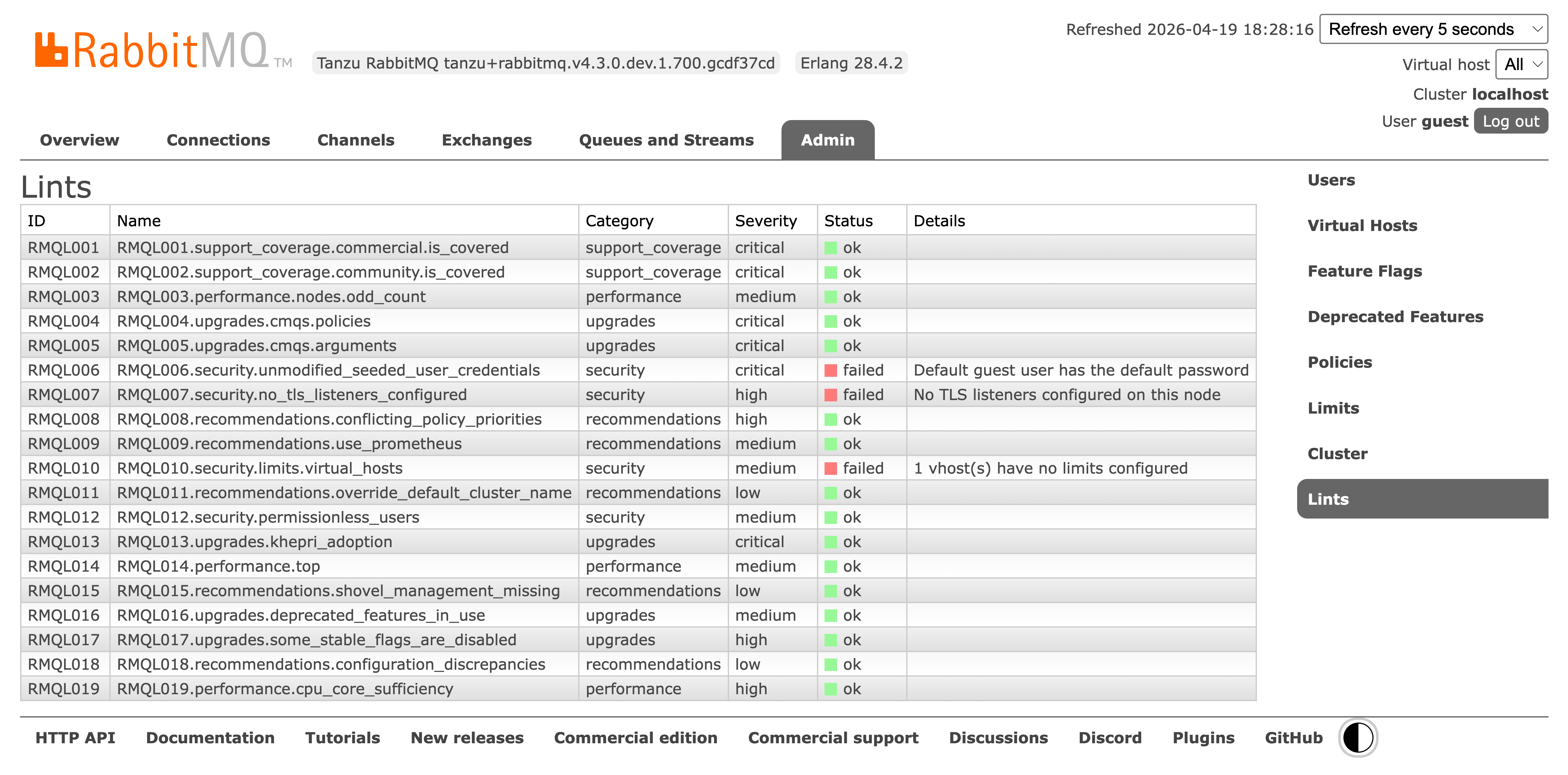
Finally, a new Linter tool is built right into the Management UI. It runs checks against your configuration to spot anti-patterns and suggest immediate, actionable improvements.
Summary
We are thrilled for you to experience RabbitMQ 4.3 and the powerful new VMware Tanzu RabbitMQ extensions. We welcome your feedback via GitHub Discussions. For support and commercial extensions, please reach out to our sales team via VMware Tanzu RabbitMQ.